ecoDMS GmbH ecoDMS GmbH
  • Software
    • Solutions Digitization, Archiving, Automation
      • ecoDMS
      • ecoMAILZ
      • ecoDMS ONE
      • ecoWorkflow
    • Extensions Addons & Apps: Included & Optionally Available
      • WORKZ Add-on
      • ecoDMS API
      • ecoDMS Integrations
      • ecoDMS ScanApp
  • Service & Support
    • Manufacturer Support Consulting via Phone, Email, Remote
      • Support Packages
      • TeamViewer Download
      • Support Request
      • Feature Request
    • Technical Details System-relevant information
      • System Requirements
      • Changelog
      • License Management
    • Manufacturer Services Services directly from the manufacturer
      • Data transfer to ecoDMS
    • Reseller Services Offers from Certified Resellers
      • Software Rental Solutions
      • ecoDMS Hosted Service
  • Info
    • Learning Webinar, Presentation, Training
      • Training & Workshops
      • Free Live Demo
    • Help Instructions, Documentation, FAQ
      • Knowledge Base / FAQ
      • Manuals (PDF)
      • Video Tutorials
      • White Paper
    • Information Press, News, Prices, License Models
      • Blog
      • Newsletter
      • Prices & Conditions
      • Press Releases
    • References & Media What others say about us
      • Submit Feedback
      • Media Coverage
      • Read Customer Feedback
      • Read Success Stories
  • Download
    • Downloads Software, Updates, Manuals, Templates & Co.
      • All Download Categories
      • ecoDMS Software & Co.
      • ecoMAILZ Software & Co.
  • Resellers
    • Our Partners Local Contacts
      • Find Resellers
      • Become a Reseller
      • Login für Reseller
  • Shop
  • Search
  • Resellers Login
  • Cart
  • Deutsch
Free Demo
ecoDMS GmbH ecoDMS GmbH
  • Software
    • Solutions Digitization, Archiving, Automation
      • ecoDMS
      • ecoMAILZ
      • ecoDMS ONE
      • ecoWorkflow
    • Extensions Addons & Apps: Included & Optionally Available
      • WORKZ Add-on
      • ecoDMS API
      • ecoDMS Integrations
      • ecoDMS ScanApp
  • Service & Support
    • Manufacturer Support Consulting via Phone, Email, Remote
      • Support Packages
      • TeamViewer Download
      • Support Request
      • Feature Request
    • Technical Details System-relevant information
      • System Requirements
      • Changelog
      • License Management
    • Manufacturer Services Services directly from the manufacturer
      • Data transfer to ecoDMS
    • Reseller Services Offers from Certified Resellers
      • Software Rental Solutions
      • ecoDMS Hosted Service
  • Info
    • Learning Webinar, Presentation, Training
      • Training & Workshops
      • Free Live Demo
    • Help Instructions, Documentation, FAQ
      • Knowledge Base / FAQ
      • Manuals (PDF)
      • Video Tutorials
      • White Paper
    • Information Press, News, Prices, License Models
      • Blog
      • Newsletter
      • Prices & Conditions
      • Press Releases
    • References & Media What others say about us
      • Submit Feedback
      • Media Coverage
      • Read Customer Feedback
      • Read Success Stories
  • Download
    • Downloads Software, Updates, Manuals, Templates & Co.
      • All Download Categories
      • ecoDMS Software & Co.
      • ecoMAILZ Software & Co.
  • Resellers
    • Our Partners Local Contacts
      • Find Resellers
      • Become a Reseller
      • Login für Reseller
  • Shop
  • Search
  • Resellers Login
  • Cart
  • Deutsch
Free Demo
Photographing and Archiving Documents on Mobile Phones
  • ecoDMS ScanApp

Your AI-Powered ScanApp for Mobile Document Management

With the ecoDMS ScanApp, you capture receipts, contracts, and invoices at lightning speed via smartphone camera and transfer them directly to the inbox of your ecoDMS archive. The integrated AI automatically ensures the perfect crop, while you can subsequently find, classify, and manage your documents completely flexibly via web client or desktop application.

Download app Test ecoDMS for free

  • The Difference in Everyday Life

Turn Your Smartphone into a Mobile Document Scanner!

  • Capturing Documents Anywhere on Your Smartphone

    Whether on the construction site, at a customer's premises, or in the home office: simply photograph the document and send it directly to the ecoDMS inbox or save it on your mobile phone. Your smartphone becomes a mobile office scanner.

  • From Paper to Archive – Easier Than Ever

    No more booting up the PC and operating a scanner. With the ScanApp, a quick photo is all it takes: the AI takes care of the perfect cropping, and your document quickly lands in the ecoDMS inbox for filing.

  • Every Document Always at Your Fingertips

    A customer asks for the latest offer, a colleague needs the signed contract. You open the app, launch the web client, type in a search term, and have the document right in front of you.

  • How the ecoDMS ScanApp Works

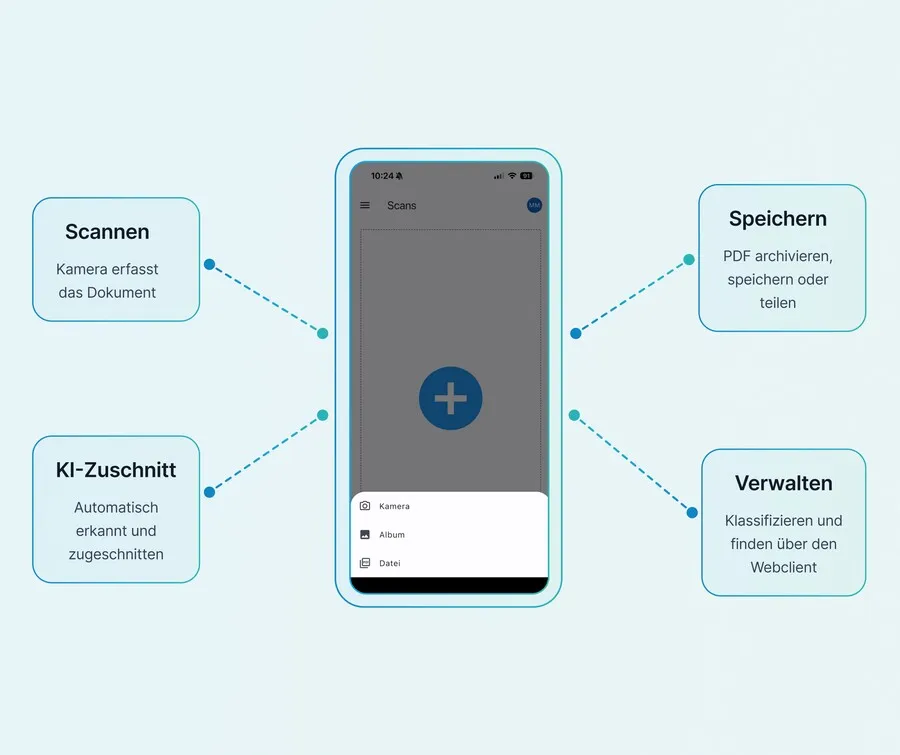
You Hold a Document in Your Hand and Seconds Later It Is in ecoDMS

  • Photographing the Document

    Simply capture receipts or contracts with your smartphone camera. For multi-page documents, you can take photos of the pages one after the other completely easily.

  • AI Crops Automatically

    The integrated AI detects the edges and corrects the alignment. You can merge multi-page captures into a coherent PDF within the app.

  • Saving & Sharing the Document

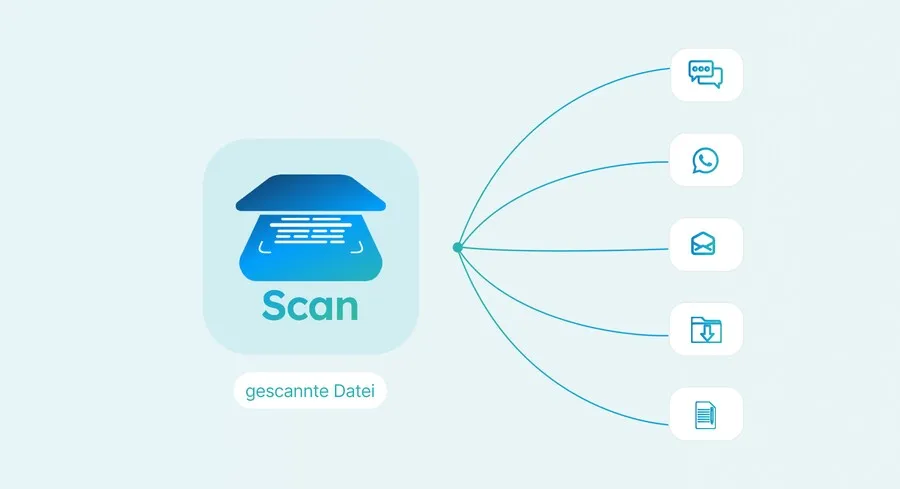
    Via "Send to ecoDMS", the document moves directly into your inbox. The secure archive connection is set up quickly and easily via a one-time barcode scan. Alternatively, you can also save the PDF locally on your smartphone, share it on WhatsApp, or send it by email.

  • Classifying and Filing

    Assign a classification to the document on your smartphone via the directly accessible web client. You can review it, finalize its archiving, or edit it – flexibly from anywhere.

Download app now

  • KI-gestützter Zuschnitt

You Take a Photo, the AI Turns It into a Perfect Document

What requires several manual steps with a conventional scanner, the ScanApp AI handles in seconds and completely automatically.

ecoDMS ScanApp KI
01

Automatic Document Recognition

The AI analyzes the camera image in real time and recognizes the document on any surface. The app visualizes the captured area and triggers the camera automatically as soon as the image is sharp enough and the document is fully within the frame.
02

Pixel-Perfect Cropping

The edges are detected with millimeter precision and the background is removed. Even with shadows or protruding edges, the cropping remains precise.

ecoDMS ScanApp KI
03

Correcting Perspective & Alignment

Crooked or twisted captures are automatically straightened. The result looks like a premium scan from a classic flatbed scanner.

04

Completely Removing the Background

Table edges and other backgrounds are automatically retouched. Only the pure document remains.

ecoDMS ScanApp KI
05

Multi-Page Documents Under Control

Insert new captures, existing images, or documents and bundle them conveniently via the app into a coherent file.

06

Manual Post-Correction Possible

Move margins, rotate pages, change exposure, or discard individual captures. The AI delivers the perfect result, but final control always remains with you.

ecoDMS ScanApp KI
01

Automatic Document Recognition

The AI analyzes the camera image in real time and recognizes the document on any surface. The app visualizes the captured area and triggers the camera automatically as soon as the image is sharp enough and the document is fully within the frame.

02

Pixel-Perfect Cropping

The edges are detected with millimeter precision and the background is removed. Even with shadows or protruding edges, the cropping remains precise.

ecoDMS ScanApp KI
03

Correcting Perspective & Alignment

Crooked or twisted captures are automatically straightened. The result looks like a premium scan from a classic flatbed scanner.

04

Completely Removing the Background

Table edges and other backgrounds are automatically retouched. Only the pure document remains.

ecoDMS ScanApp KI
05

Multi-Page Documents Under Control

Insert new captures, existing images, or documents and bundle them conveniently via the app into a coherent file.

06

Manual Post-Correction Possible

Move margins, rotate pages, change exposure, or discard individual captures. The AI delivers the perfect result, but final control always remains with you.

ecoDMS ScanApp: AI-Powered Document Scanner Directly and Conveniently on Your Smartphone

One App – Many Functions

ecoDMS ScanApp

Transform your smartphone into an intelligent document scanner. With the ecoDMS ScanApp, you digitalize contracts, receipts, and notes from anywhere – lightning-fast and absolutely effortless. Thanks to integrated artificial intelligence (AI), every scan is automatically aligned, cropped, and optimized perfectly. This is mobile document management that noticeably simplifies your everyday work and puts an end to paper clutter.

Install app for free

  • Intelligent AI Alignment

    Simply take a photo: the app automatically detects edges, straightens the document, and ensures optimal image quality.

  • Flexible PDF Management

    Add or delete pages as you wish, or change their order. Ideal, for example, for replacing a single, signed contract page in a flash.

  • Sharing & Splitting Documents

    Divide multi-page PDFs and split them into individual pages. Perfect for portioning documents exactly according to your needs.

  • Visual Filters & Rotation

    Optimize new and existing pages afterward: rotate documents into the correct view and use filters to brighten, darken, or sharpen.

  • Direct Connection to ecoDMS

    Send scans to your ecoDMS inbox for secure archiving with just a single click. Accessing your archive works on the go via the web client directly from the app.

  • Sharing on All Channels

    Whether saving locally on your smartphone, sending by email, or sharing quickly via WhatsApp – your documents reach their destination instantly.

  • Setting Up the ecoDMS ScanApp

Ready to Go in Just a Few Steps

  • Installing the App

    Download the ecoDMS ScanApp free of charge from the App Store or Google Play Store.

  • Configuring Access

    Activate web and remote access in the ecoDMS settings and set up the user rights.

  • Connecting the Profile

    Scan the barcode from the Connection Manager to link your app profile directly with ecoDMS.

  • Getting Started and Archiving

    After device authorization, you can immediately start photographing and archiving your documents.

  • Screenshots & Videos

Take a Look at the ecoDMS ScanApp User Interface

Watch YouTube Video about App

  • Is the ecoDMS ScanApp Right for Me?

The ecoDMS ScanApp Was Developed for These Requirements

  • You Regularly Work Away From the Office

    In field service, on construction sites, during customer appointments, or on business trips, documents accumulate that need to be captured immediately instead of ending up on a pile.

  • Your Team Works Across Different Locations or From Home Offices

    Not every employee has access to the office scanner. With the ScanApp, everyone in the team can capture and archive documents, regardless of their workspace.

  • You Want to Reduce Paper-Based Processes in Your Company

    Documents in your company still go through the cycle of printing, signing, scanning, and manual filing. The ScanApp shortens this process to just a photo and a single tap.

  • You Want to Get Contracts Countersigned Quickly and Easily

    Save time and paper: For multi-page PDFs, print only the signature page. Once signed, simply rescan this page and replace it directly within the app.

  • FAQ

Frequently Asked Questions About the ecoDMS ScanApp

Can I also use the ScanApp without ecoDMS?

Yes, the ecoDMS ScanApp also works completely independently. You can use it at any time to photograph documents with your smartphone, crop or optimize them directly within the app, and then save them as a PDF. The finished files can then be flexibly shared via email or messenger, as well as saved in other apps and cloud services.

Download ScanApp for free

Is the ecoDMS ScanApp free of charge?

As of version 26.01, the ScanApp is a free component of the ecoDMS Full Version and does not incur any additional licensing costs. The app is also fully provided in the Free Trial. Alternatively, the ScanApp functions completely independently of ecoDMS in standalone mode: This allows any document to be photographed flexibly from new photos, existing images, and documents as a PDF with a smartphone and digitized directly as a PDF.

For which operating systems is the app available?

The ecoDMS ScanApp is available for iOS and Android and can be downloaded from the Apple App Store as well as the Google Play Store. The app works on standard smartphones and requires an active connection to your ecoDMS server.

Download now for free

Can I use the app with multiple ecoDMS servers and profiles?

Yes, the ScanApp supports multi-profile usage. You can set up multiple ecoDMS instances or user accounts in the app and switch between them without having to log in again each time. This is particularly practical if you manage multiple clients or locations.

Does the ScanApp replace a conventional document scanner?

For quickly capturing individual documents or smaller batches on the go, the ScanApp is a full alternative to a flatbed scanner. For large document volumes in the office, we still recommend using an appropriate network scanner.

Company Logo
Company
  • About Us
  • Careers
  • Contact + Business Hours
  • Legal Notice
Legal
  • Privacy Policy
  • Data Processing Agreement
  • Terms and Conditions
  • Right of Withdrawal / Cancel Contract
Interessante Links
  • Solutions for Private Users
  • Solutions for Businesses
  • Support & Service Offers
  • Resellers & Purchasing Options
  • Academy + Continuing Education
  • Certificates & Associations
Social Media
Akzeptierte Zahlungsmethoden
  • Visa
  • Mastercard
  • PayPal
  • Google Pay
  • Apple Pay
  • SEPA Lastschrift
  • Überweisung / Vorkasse
Supported Systems
  • Windows
  • Linux
  • macOS
  • NAS
  • Smartphone
  • Tablet
  • Deutsch
Free Demo
  • Software
    • Solutions
      • ecoDMS
      • ecoMAILZ
      • ecoDMS ONE
      • ecoWorkflow
    • Extensions
      • WORKZ Add-on
      • ecoDMS API
      • ecoDMS Integrations
      • ecoDMS ScanApp
  • Service & Support
    • Manufacturer Support
      • Support Packages
      • TeamViewer Download
      • Support Request
      • Feature Request
    • Manufacturer Services
      • Data transfer to ecoDMS
    • Reseller Services
      • Software Rental Solutions
      • ecoDMS Hosted Service
    • Technical Details
      • System Requirements
      • Changelog
      • License Management
  • Info
    • Learning
      • Training & Workshops
      • Free Live Demo
    • Help
      • Knowledge Base / FAQ
      • Manuals (PDF)
      • Video Tutorials
      • White Paper
    • Information
      • Blog
      • Newsletter
      • Prices & Conditions
      • Press Releases
    • References & Media
      • Submit Feedback
      • Media Coverage
      • Read Customer Feedback
      • Read Success Stories
  • Download
    • Downloads
      • All Download Categories
      • ecoDMS Software & Co.
      • ecoMAILZ Software & Co.
  • Resellers
    • Our Partners
      • Find Resellers
      • Become a Reseller
      • Login für Reseller
  • Shop
  • Search
  • Resellers Login
  • Cart